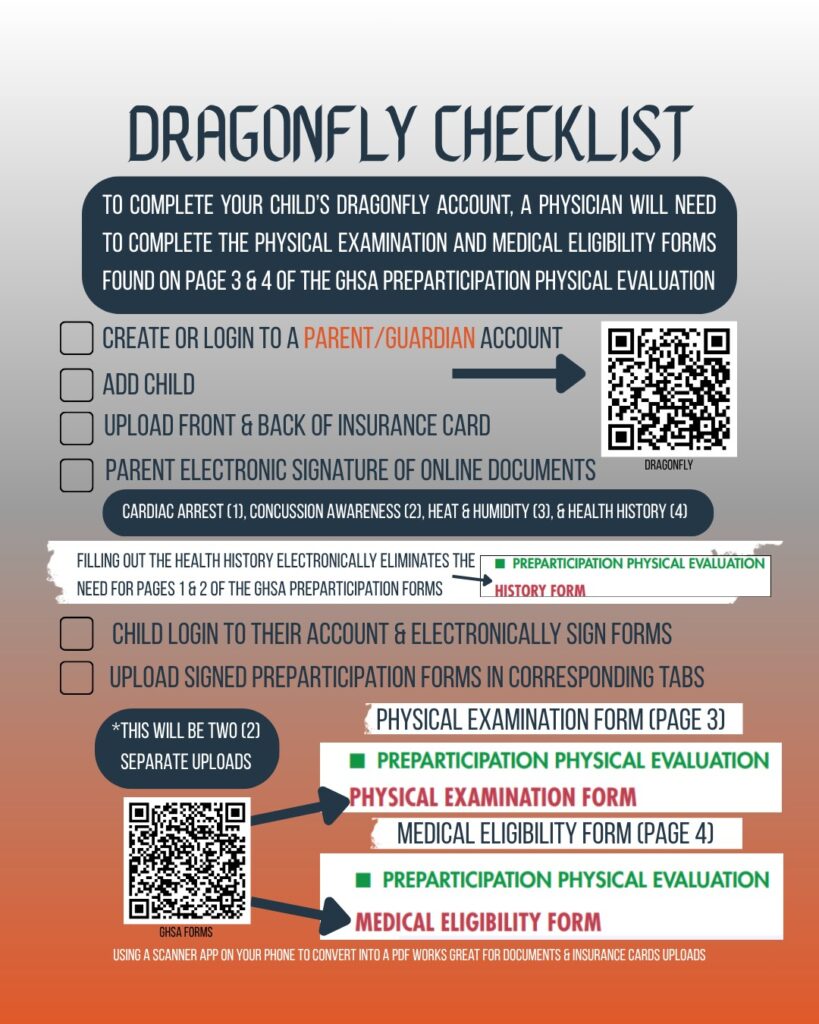
DragonFly
Parents need to create their DragonFly account first. During your registration process, you will create an account for your daughter. Once you have electronically signed off on the documents, your daughter will need to sign-in to their account and electronically sign off. These are two different types of accounts, parent & athlete
Choose Georgia and East Forsyth High School to connect the accounts to East. When choosing the sport, select Girls Volleyball – Varsity. We house all the high school DragonFly accounts within that sport (this does not mean your daughter is on the varsity team).
Both sides of the Insurance Card must be uploaded to DragonFly
The copy of the insurance card needs to show both the Front of the Card and the Back of the Card. We suggest using a scanner app on your mobile device to create a pdf, which would allow you to scan multiple pages into one smaller file to upload into the Insurance Card section. The Insurance Card will be rejected without both sides of the card uploaded to DragonFly.
Physical Forms
To participate in a GHSA sponsored sport, you will need to have a physical form signed & dated by a licensed physician, within one calendar year. This is a non-negotiable and we cannot make exceptions to this rule. The pdf document provided by the GHSA is four (4) pages in length, titled the Preparticipation Physical Evaluation. The first two (2) pages comprise the History Form, which can be completed electronically or printed, completed, and uploaded to DragonFly. We suggest completing it electronically. Page three (3) of the Preparticipation Physical Evaluation is known as the Physical Evaluation Form, which requires a licensed physician to complete, sign, and date. This will be uploaded separately to the Physical Evaluation Form section of DragonFly. Page four (4) of the Preparticipation Physical Evaluation is known as the Medical Eligibility Form, which requires a licensed physician to complete, sign, and date. This will be uploaded separately to the Medical Eligibility Form section of DragonFly. Below are screenshots of the three (3) sections of the GHSA Preparticipation Physical Evaluation pdf. Refer to the red subtitle to differentiate which form is which and where it needs to be uploaded into DragonFly.

The History Form (pages 1 & 2 of the pdf document) can be completed electronically through your DragonFly account.
GHSA Physical Form

The Physical Examination Form (page 3 of the pdf document) must be signed by a physician and the date must be within one calendar year to be considered valid. The Physical Examination Form (page 3) will have a section within the DragonFly account to upload a copy of the document. Page 3 will be the only one you upload to the Physical Examination Form section of the DragonFly account.
GHSA Physical Form

The Medical Eligibility Form (page 4 of the pdf document) must also be signed by a physician and the date must be within one calendar year to be considered valid. Similar to the Physical Examination Form, the Medical Eligibility Form will be uploaded to a section within the DragonFly account. Page 4 will be the only page you upload to the Medical Eligibility Form section of the DragonFly account.